

Description
Download 1st Email Address Verifier 2006 – Reliable email validation tool for Mac
Overview
The 1st Email Address Verifier 2006 is a lightweight Mac‑only utility designed to quickly confirm whether an email address is syntactically correct and still active on the internet. Launched in 2006 and still popular among small‑business owners and marketers, the program offers a trial version that lets you test bulk lists before committing to a full purchase. Built under the Internet software category with a focus on bulk mailing, the verifier checks MX records, SMTP responses, and common typo patterns, helping you keep your mailing list clean and your sender reputation intact. Even though the software is over a decade old, its core engine remains fast, secure, and free of unnecessary bloat, requiring only a few megabytes of disk space. The latest public update (v4.45) was released on June 29 2006, and the program continues to be distributed in English for macOS users. With more than 533 downloads since its catalog debut, the tool has proven its value for anyone who needs a trustworthy, no‑frills solution for email list hygiene.
Key Features and Benefits
- Bulk verification – process thousands of addresses in a single run.
- Real‑time SMTP handshake – confirms the mailbox exists without sending an email.
- MX record lookup – validates that the domain’s mail server is reachable.
- Typo detection – flags common mistakes such as “gnail.com” or “yaho.com”.
- Lightweight footprint – occupies less than 5 MB of free space on your Mac.
- Simple UI – one‑click start, progress bar, and exportable CSV results.
- Trial mode – test up to 100 addresses before purchasing the full version.
- Secure operation – no data is transmitted to third‑party servers; verification happens locally.
These features translate into tangible benefits for everyday users. Marketers can dramatically reduce bounce rates, saving money on email service provider fees and improving campaign deliverability. IT administrators gain confidence that internal contact lists are up‑to‑date, preventing missed notifications. Even freelancers who sell newsletter services can offer a higher‑quality product by proving that each address has been validated with a reputable tool. Because the software runs entirely on macOS, there is no need to install additional libraries or configure complex server settings—just drag your CSV file, click “Verify,” and let the engine do the heavy lifting. The combination of speed, accuracy, and a user‑friendly interface makes 1st Email Address Verifier 2006 a solid choice for anyone looking to keep their email outreach clean and effective.
Installation, Usage, Compatibility & Pros / Cons
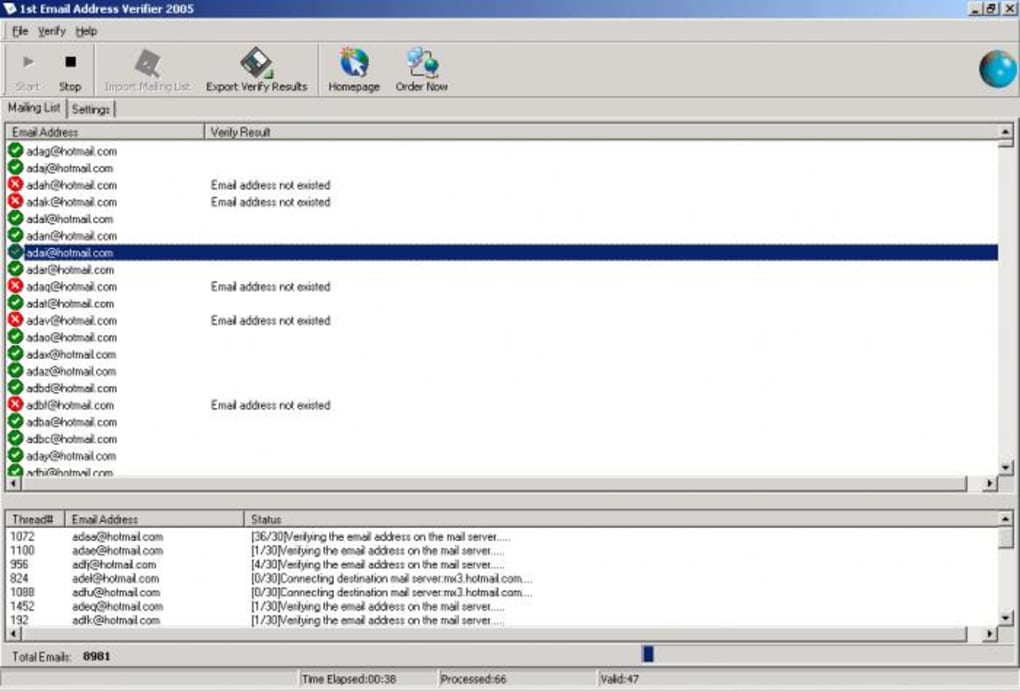
Installing 1st Email Address Verifier 2006 is straightforward. Download the DMG file from the official site, open it, and drag the application icon into your /Applications folder. The installer does not require admin privileges, making it suitable for shared Mac environments. Once installed, launch the app and you will be greeted by a minimalist window where you can import a CSV or TXT file containing the email addresses you wish to verify. After selecting the file, click the “Start Verification” button. The progress bar updates in real time, and each result is displayed with a green checkmark for valid addresses or a red X for invalid ones. When the process completes, you can export the cleaned list to a new CSV file, ready for upload to your mailing platform.
The software is compatible with macOS 10.4 Tiger through macOS 10.6 Snow Leopard. Although it was designed for older systems, it still runs on newer Macs via compatibility mode or virtualization tools. No additional runtime (such as Java) is required, keeping the installation lightweight.
Pros
- Fast bulk verification without internet‑based APIs.
- Runs locally, ensuring privacy of your contact data.
- Very low system requirements – works on older Macs.
- Free trial lets you evaluate accuracy before purchase.
- Simple, no‑learning‑curve interface.
Cons
- Limited to macOS; no Windows or Linux version.
- Last official update was in 2006, so UI feels dated.
- Trial version caps verification at 100 addresses.
- No built‑in integration with modern email platforms.
Overall, the tool offers reliable validation for Mac users who need a quick, secure way to clean email lists without spending on cloud services.
Frequently Asked Questions
Can the verifier check if an email address is currently receiving mail?
Yes. The software performs an SMTP handshake that confirms the mailbox exists and is able to receive messages, without actually sending an email.
Is my data safe during verification?
All checks are performed locally on your Mac. No address data is transmitted to external servers, ensuring privacy and compliance with data‑protection regulations.
What file formats are supported for import?
CSV and plain‑text (TXT) files are supported. Each line should contain a single email address, or you can use a column header in CSV format.
Can I use the trial version for large campaigns?
The trial limits verification to 100 addresses per session. For larger lists, you’ll need to purchase the full license, which removes this restriction.
Is there any technical support available?
Yes. The developer provides email support for licensed users, and the official website hosts a knowledge base with troubleshooting guides.
Conclusion – Get a Cleaner List Today
If you need a straightforward, secure way to validate email addresses on a Mac, 1st Email Address Verifier 2006 delivers exactly that. Its bulk processing, local verification, and tiny footprint make it an attractive option for marketers, freelancers, and small businesses alike. While the UI reflects its 2006 origins, the core functionality remains solid and reliable. Download the free trial now, test a handful of contacts, and see the bounce‑rate reduction for yourself. When you’re ready, upgrade to the full version to unlock unlimited verification and keep your campaigns running smoothly.
Guides & Tutorials for 1st Email Address Verifier 2006
How to install 1st Email Address Verifier 2006
- Click the Preview / Download button above.
- Once redirected, accept the terms and click Install.
- Wait for the 1st Email Address Verifier 2006 download to finish on your device.
How to use 1st Email Address Verifier 2006
This software is primarily used for its core features described above. Open the app after installation to explore its capabilities.
User Reviews for 1st Email Address Verifier 2006 0
No reviews found





.webp)